The Great Decoupling: Quick Recap
FormLang treats workflows as standalone applications, not platform configurations. This architectural shift enables all the features and capabilities below.
Want the architectural deep-dive? Learn about The Great Decoupling architecture on the Platform page
Traditional
Platform-Dependent • Testing Requires Coordination • High Latency
FormLang
Self-Sovereign Apps • Sandbox Testing • Instant Validation
Four Pillars: From Architecture to Capabilities
On the Platform page, you learned the architectural WHY behind each pillar. Now see the practical capabilities each pillar enables.
Zero-Gravity Architecture
The "Light" Workflow
Break free from heavy backend engines. We compile your logic into a lightweight client-side runtime. Testing a 100-step process is now as easy as testing a single function.
Learn MoreRole Isolation
The "Dedicated" App
Each participant gets a dedicated application tailored to their role. Context-aware navigation, split-views, timeline history—no dashboard clutter.
See ExampleDeterministic Logic Engines
Unbreakable Workflow Logic
Proprietary Form Language with client-side runtime computation ensures workflows are deterministic and testable. Catch errors at design-time, not production.
View Expression EditorUnified Testing & Deployment
Zero Environment Drift
Test in sandbox mode, demonstrate to stakeholders, then promote to production—all from one diagram. What you test is exactly what runs in production.
Explore TestingInstant Compilation Capabilities
The "Light" Workflow: Traditional BPMN platforms give you XML + APIs, requiring 6-8 weeks of front-end development. FormLang compiles your diagram into complete applications in minutes.
Learn about Zero-Gravity Architecture on the Platform page
What You Get (From One BPMN Diagram)
Complete Web Applications
- Professional UI (no custom code)
- Context-aware navigation
- Responsive design (mobile-ready)
- Authentication integration
Workflow Execution Logic
- Automatic workflow progression
- Multi-step form handling
- Conditional branching
- Task assignment logic
Form Generation
- Auto-generated form UI
- Built-in validation
- Conditional field display
- Multi-page form support
Instant Testing
- Sandbox mode (isolated environment)
- Test in minutes (not days)
- No backend setup required
- Unlimited test iterations
Time Saved: From 6-8 weeks of custom development to 10 minutes of compilation. See it working
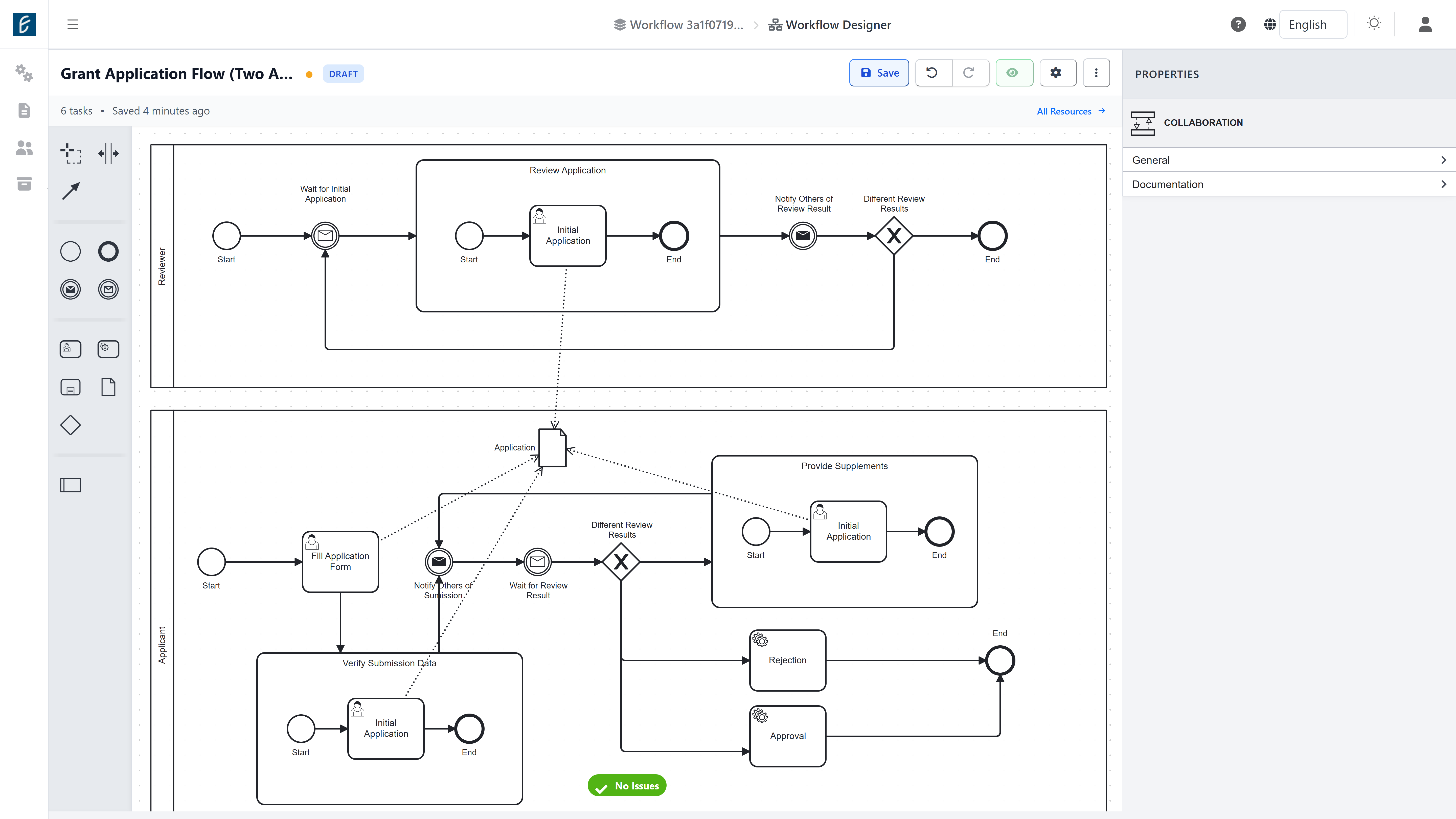
See Pillar I in Action
Our Grant Application example shows how one BPMN diagram generates two complete applications (Applicant + Reviewer) in under 10 minutes.
Dedicated Application Features
The "Dedicated" App: Traditional platforms use shared dashboards where everyone sees everything. FormLang generates dedicated applications for each role—focused, distraction-free, and context-aware.
Learn about Role Isolation architecture on the Platform page
Role-Specific Application Features
Dedicated Role-Based Applications
- Each role gets dedicated web application
- Only sees relevant tasks and forms
- No dashboard clutter or irrelevant notifications
- Context-aware interface (knows your position)
Automatic Navigation
- App knows exactly where you are in workflow
- Automatic routing to next task
- "What's next?" always answered
- No manual task searching or filtering
Split-View Interfaces
- See historical context + current action together
- Timeline view of workflow progress
- Previous forms displayed side-by-side
- Never lose context during long workflows
Productivity Gain: 40% faster task completion—users always know where they are and what's next. Experience it
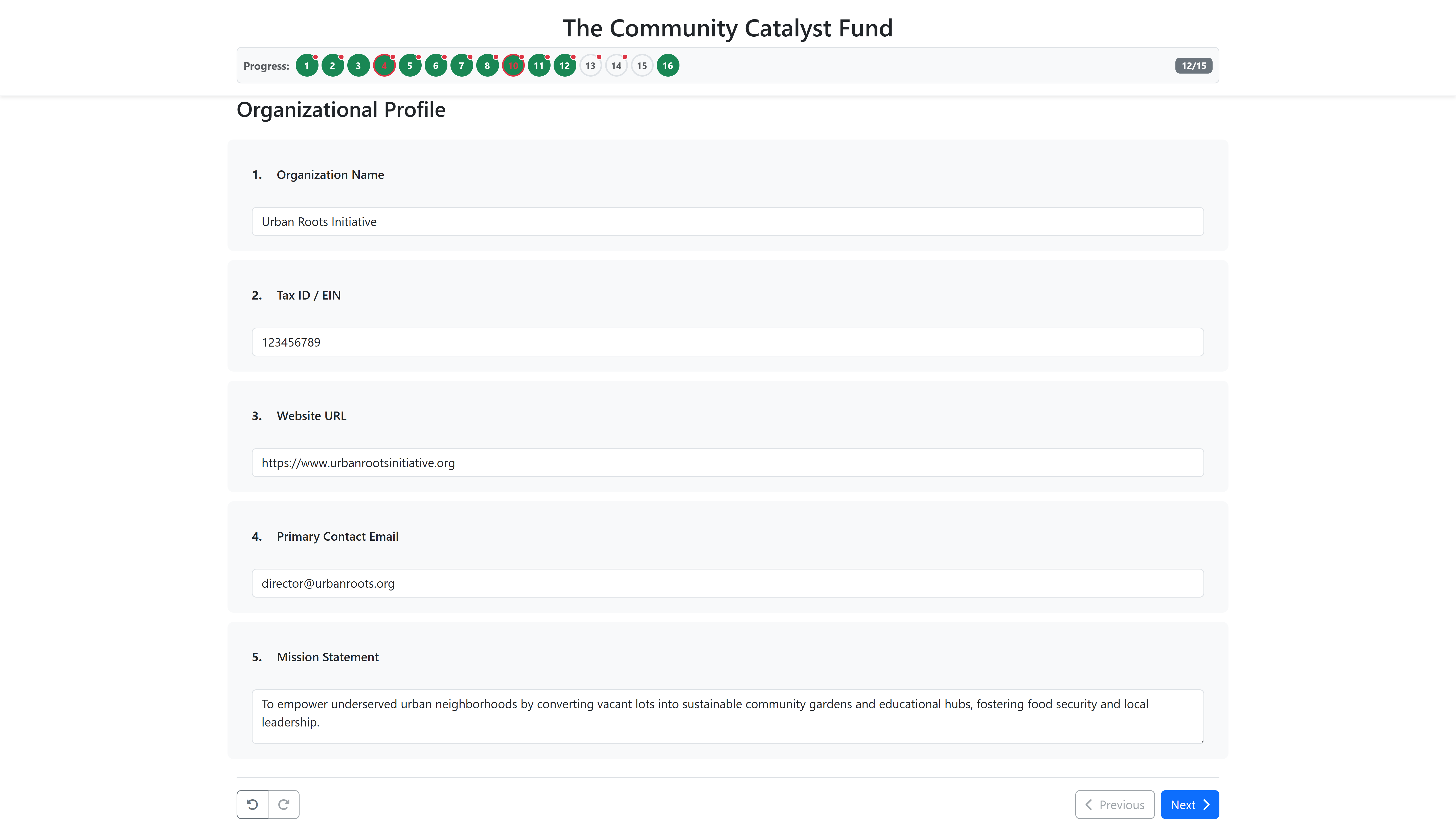
Applicant's Dedicated App
Only sees submission tasks and forms. No access to review features.
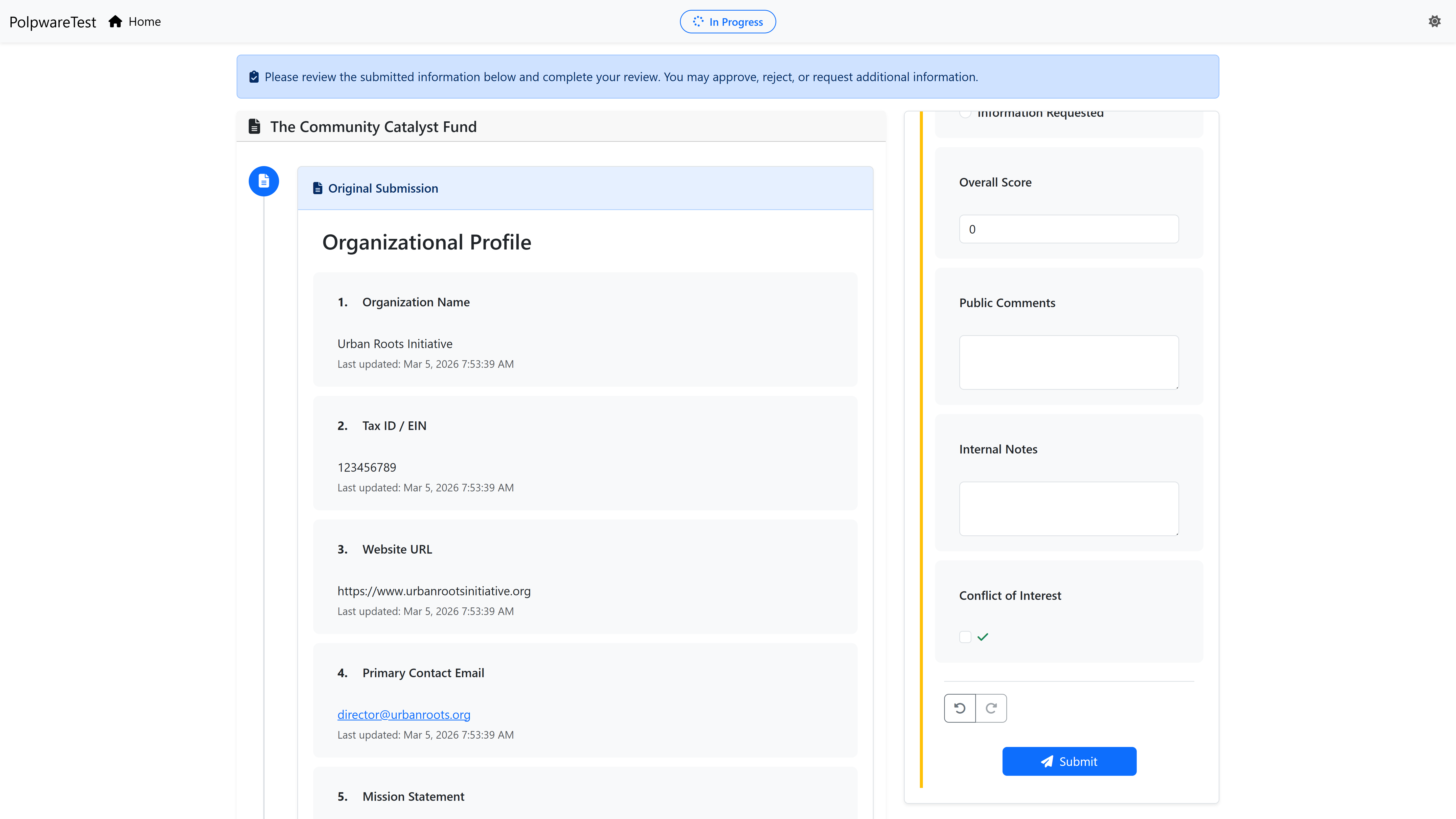
Reviewer's Dedicated App
Only sees review tasks and approval forms. Completely separate from applicant view.
See Pillar II in Action
In our Grant Application example, the Applicant never sees the Reviewer's tasks, and the Reviewer never sees the Amendment form. Each app is focused, distraction-free, and sufficient for the user to complete their work.
Unbreakable Logic Features
Unbreakable Workflow Logic: Traditional no-code platforms fail with complex logic. FormLang uses a proprietary logic engine with client-side execution for deterministic, testable workflows.
Learn about Deterministic Logic architecture on the Platform page
Validation & Logic Capabilities
Proprietary Logic Engine
- Purpose-built DSL for workflow logic
- Type-safe expression evaluation
- Compile-time error detection
- Auto-completion and syntax validation
Instant Client-Side Validation
- Zero-latency field validation
- Real-time feedback (0-10ms)
- No server round-trips needed
- Works offline with full fidelity
Expression Testing
- Test expressions in sandbox mode
- Catch edge-case bugs at design-time
- Validate complex conditional logic
- Test with sample data instantly
Type-Safe Transformations
- Strongly-typed data conversions
- Prevents type mismatch errors
- Validated data transformations
- Predictable calculation results
Quality Improvement: 95% reduction in production logic errors—catch bugs at design-time, not in production. Test validation
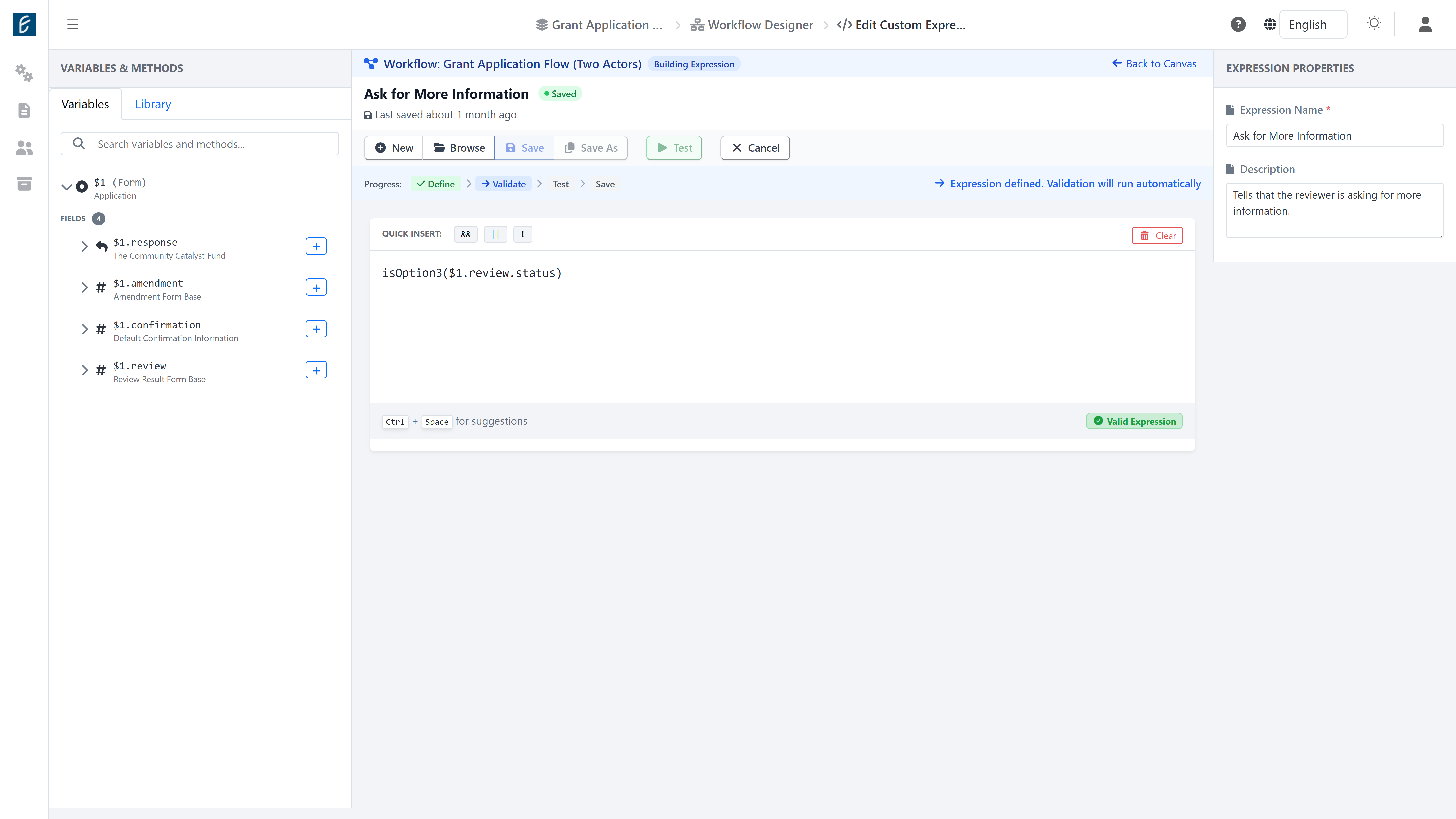
See Expression Editor in Action
Our Grant Application example demonstrates complex conditional logic, data transformations, and validation rules—all tested in sandbox mode before deployment.
Multi-Mode Deployment
Zero Environment Drift: Traditional platforms separate test and production, causing configuration drift and bugs. FormLang's unified architecture ensures the workflow you test IS the workflow you deploy.
Learn about Unified Testing architecture on the Platform page
Available Deployment Modes
Sandbox Mode
- Isolated testing environment (no backend)
- Instant testing in minutes
- Unlimited resets and iterations
- No production data pollution
Production Mode
- Real-time database persistence
- Complete audit trail logging
- Multi-user coordination
- Email notifications enabled
Demo Mode
- Pre-populated sample data
- Guided workflow tours
- Read-only access for viewers
- Perfect for sales demos
Audit Mode
- Complete history tracking
- Immutable audit logs
- Compliance reporting
- Time-travel debugging
Deployment Flexibility: Switch strategies instantly without code changes or re-deployment. Same workflow, different behaviors. Try sandbox mode
Sandbox Mode
Browser LocalStorage, no backend required. Test workflows instantly without database setup.
In-Memory TestingProduction Mode
Database API with full persistence. Live workflows with multi-user coordination.
Full PersistenceDemo Mode
Isolated instance with sample data. Showcase workflows without affecting production.
Isolated InstanceSee Pillar IV in Action
Experience the power of strategy-based instantiation: Test the Grant Application workflow in sandbox mode—complete the entire lifecycle in minutes without coordinating real users or databases.
The Four Pillars Working Together
Our Grant Application use case demonstrates all four pillars in a real-world workflow: browser-executed state machines, role-isolated applications, deterministic validation, and sandbox testing.
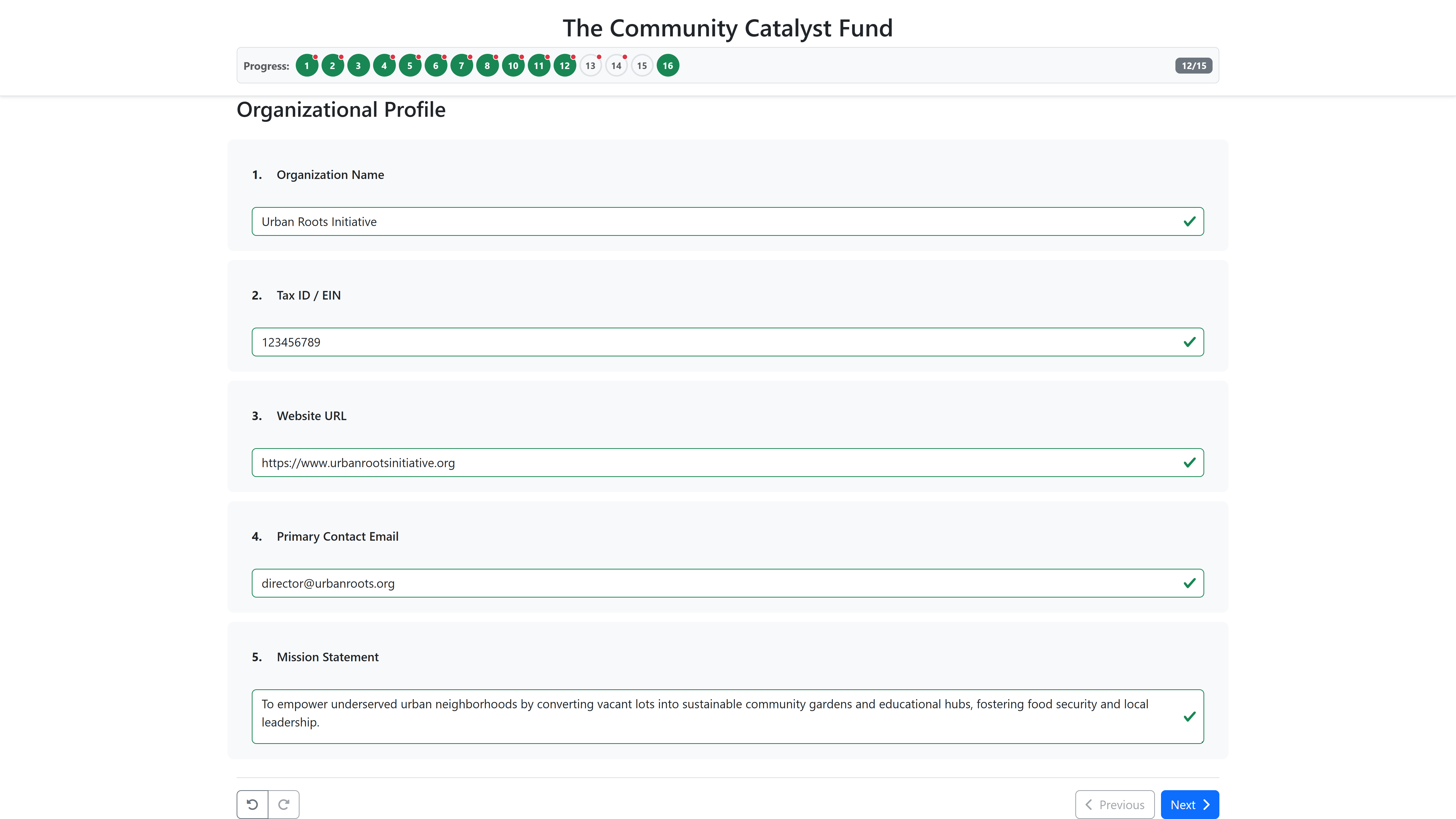
Applicant Application
Dedicated app for applicants with role-isolated state machine. Instant validation, auto-save, and progress tracking—all running in the browser.
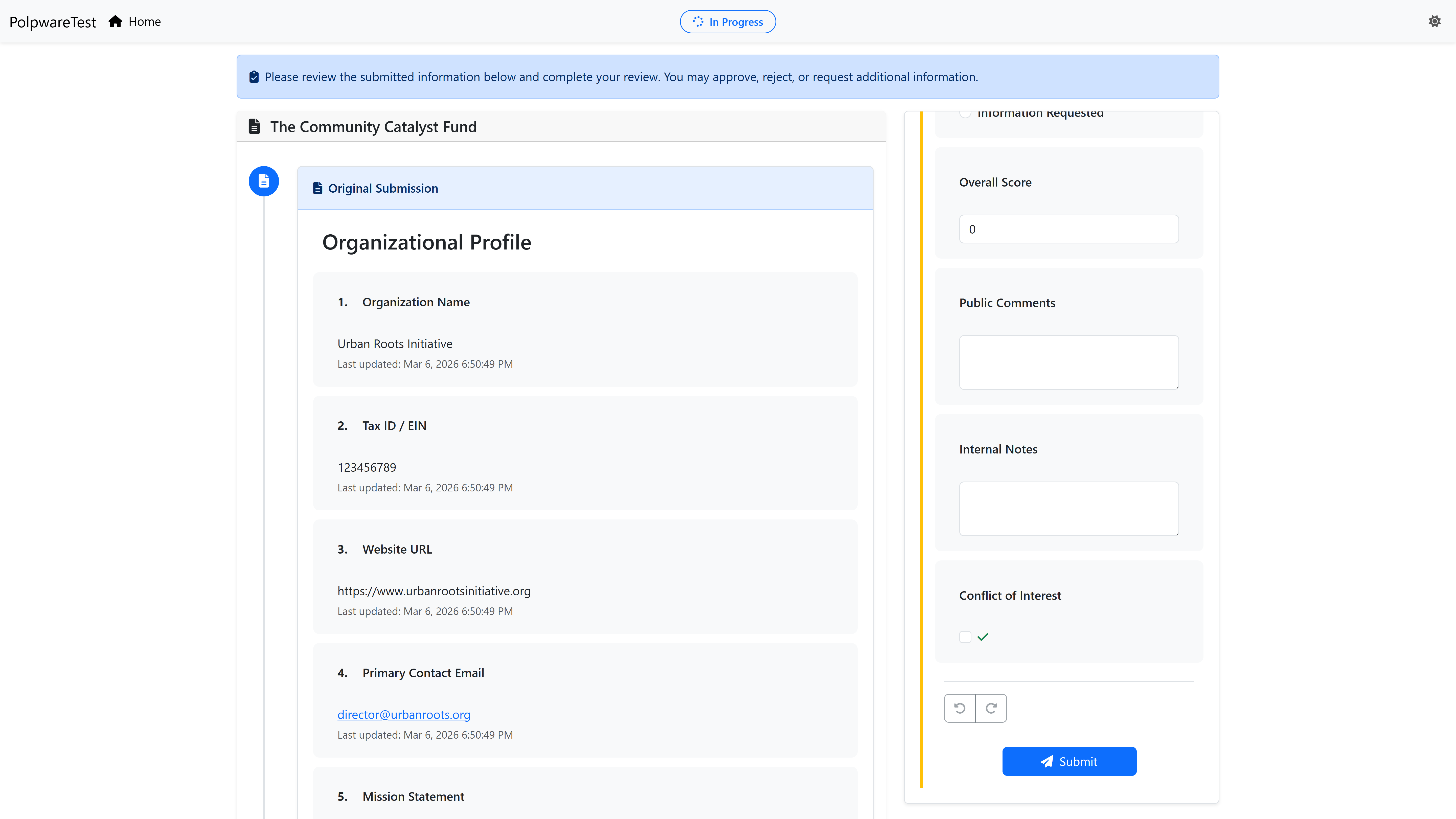
Reviewer Application
Separate app for reviewers with split-view interface. Historical context + current action side-by-side. Never sees applicant's waiting states.
Test the Complete Workflow in 5 Minutes
Experience all four pillars firsthand: Open two browser tabs, play both roles (Applicant + Reviewer), and complete the entire workflow lifecycle—from submission to approval—in minutes, not days.
Enterprise-Ready Features
The Four Pillars provide the foundation. These capabilities ensure FormLang meets enterprise requirements for access control, mobile access, and compliance.
Multi-Audience Access Control
Publish workflows to employees, visitors, or guests—each with appropriate access controls and authentication methods.
- Attribute-based access control (ABAC)
- Role-based permissions
- Secure guest access
Mobile-Ready Web Applications
All workflow applications are fully responsive and optimized for mobile browsers. Native iOS and Android apps launching Q2 2025.
- Responsive web applications (works on any device)
- Mobile browser optimization
- Native apps coming Q2 2025
Security & Compliance
Enterprise-grade security with encryption, compliance reporting, and granular access controls.
- Data encryption at rest and in transit
- GDPR compliance support
- SOC 2 Type II certified infrastructure
Multi-Language Support
Internationalize your workflows with built-in multi-language support for forms, notifications, and user interfaces.
- Translate forms into multiple languages
- Language-specific validation rules
- Localized notifications
Visitor Groups
Advanced visitor management with group-based workflows, secure check-in processes, and comprehensive tracking.
Perfect for educational institutions, corporate offices, healthcare facilities, and government buildings that need secure, professional visitor management.
View Visitor Use Case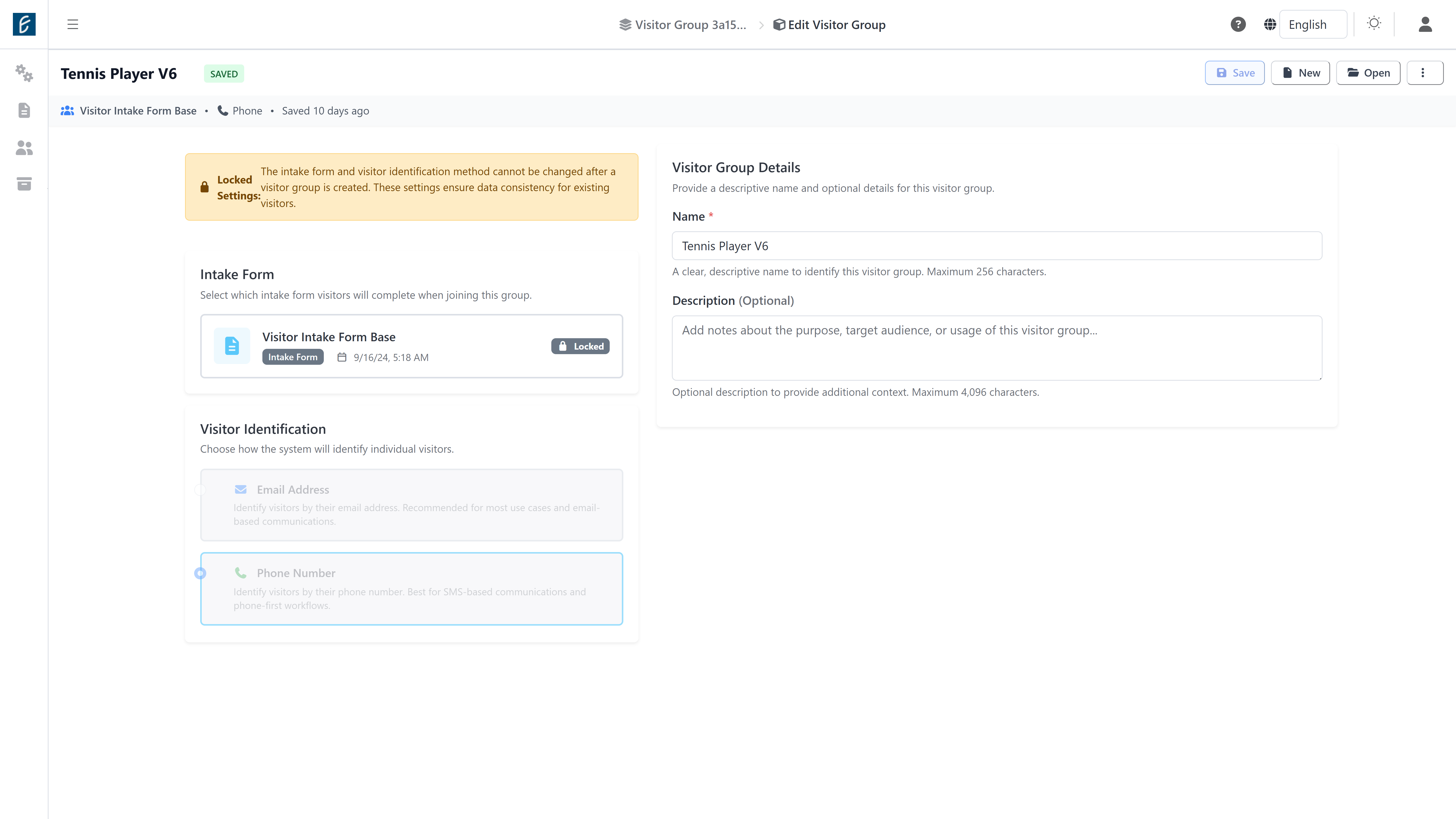
Feature Availability by Plan
All plans include core workflow automation. Choose the plan that matches your organization's needs.
| Feature | Free | Professional | Enterprise |
|---|---|---|---|
| BPMN 2.0 Workflow Designer | |||
| Multi-Page Forms | |||
| Thread-Based Audit Trails | |||
|
REST API Access
Programmatic workflow control |
Read-Only |
||
| Visitor Groups | |||
|
Mobile Apps (iOS/Android)
Redesigned apps in development |
Q2 2025 |
Q2 2025 |
|
|
Multi-Language Support
15+ languages supported |
UI Only |
||
|
Webhook Integrations
HTTP callbacks for external systems |
Basic |
||
|
Enterprise SSO
SAML 2.0, OAuth 2.0, Azure AD |
|||
|
Custom Branding
Logo, colors, and themes |
Logo + Color |
||
| Priority Support | 24/7 |
All plans include: Unlimited workflows, forms, and participants • 99.9% uptime SLA • Data encryption at rest and in transit
Feature Notes:
- Mobile Apps: Legacy apps available but being redesigned for modern UX. New native apps launching Q2 2025. Learn more
- Free Tier API Access: Read-only endpoints for workflow and form queries. Pro/Enterprise includes full CRUD operations.
- Multi-Language (Free): UI language selection only. Pro/Enterprise includes form content translation and localized notifications.
- Custom Branding (Professional): Logo and primary color customization. Enterprise includes full theme customization and white-label options.
Ready to Experience The Great Decoupling?
See all four pillars in action with our Grant Application use case—test a complete workflow in minutes, not days. Start free—no credit card required.
Try Grant Application Get Started FreeSee FormLang in Action
Explore real-world workflow automation examples from organizations like yours.
Browse Use Cases